Pairwise image
Our highly configurable pairwise image experiment allows you to present raters with two alternatives, and to ask which one they prefer. Optionally, a third reference image may be shown against which the images will then be compared.
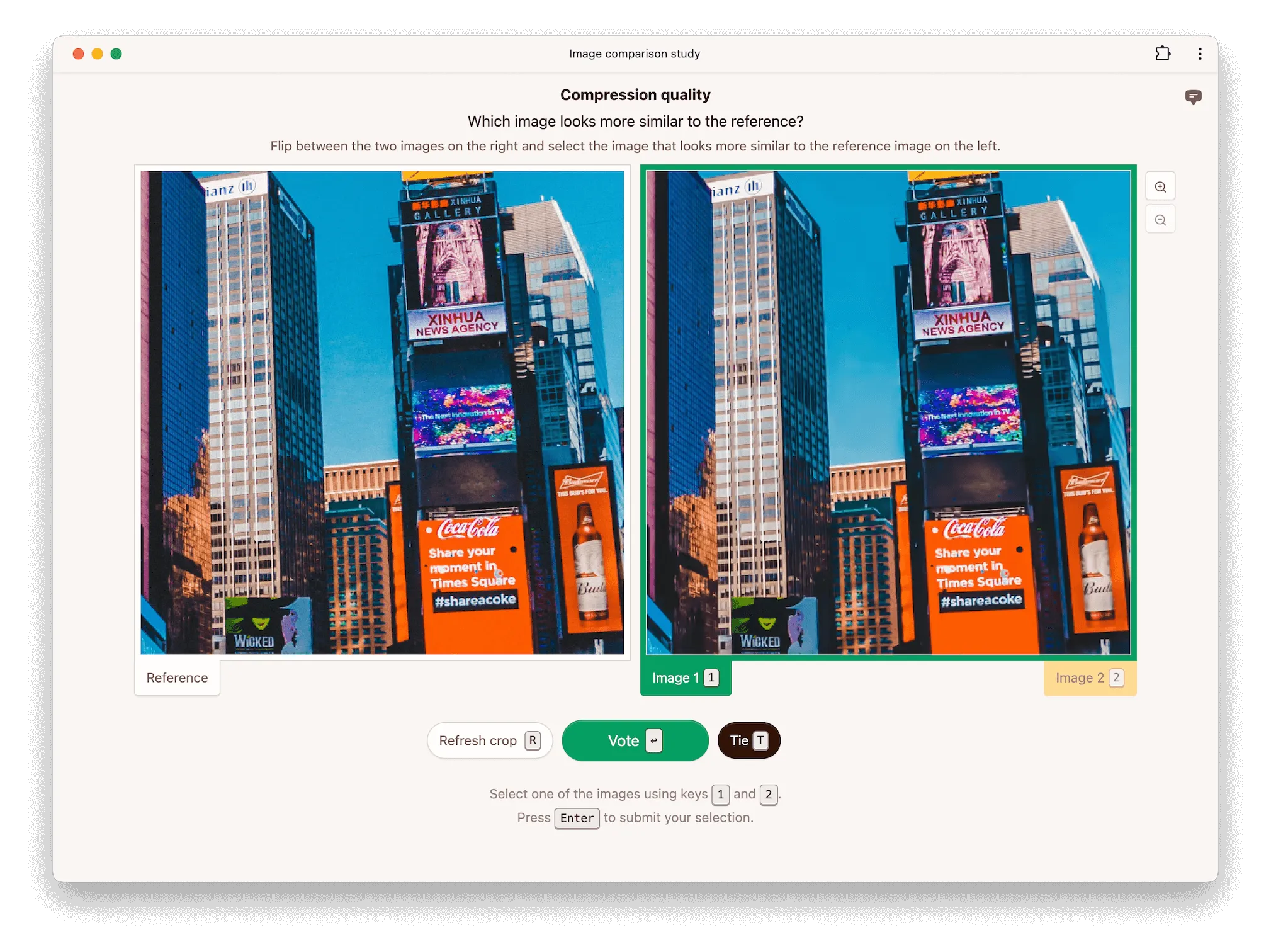
Pairwise comparisons are a popular choice for evaluating the quality of images produced, for example, by compression methods or text-to-image generative models [e.g., 1, 2, 3]. They have been shown to be more efficient than asking raters to evaluate images on an absolute category rating scale [4]. They also make it easier to apply active selection strategies, enabling further efficiency gains.
Modes
The pairwise image experiment supports three modes which determine how the images are arranged on the screen. Side-by-side mode presents the images next to each other.
Alternatively, raters can be asked to flip between conditions, in which case the two images are placed on top of each other. This makes it easier for raters to spot differences between the two conditions being evaluated. The reference is displayed separately next to the two conditions.
Finally, raters can be asked to flip between the reference and conditions, in which case all three images are stacked on top of each other. This makes it easier for raters to spot differences between the conditions and the reference.
Options
Show reference
If disabled, no reference image is shown even if a reference is present in the dataset. If enabled, a reference image is shown when available in the dataset.
Hidden reference
When enabled (the default for new experiments), the reference is included among the conditions being compared, so a pair may consist of a condition and the reference without the rater knowing which is which. This is independent of show reference, which controls whether a labeled reference is displayed alongside the pair.
Allow ties
If enabled, raters are allowed to respond that they find both images equally preferable. Whether or not allowing ties is beneficial depends on the data and the rater pool.
Cropping
Images may be cropped for practical reasons if the full-resolution images do not fit on the screen, and you do not wish to scale them down. Another reason why you may wish to crop images is to learn more about where a rater focused their attention when making a decision. Image compression methods, for example, often perform differently on different parts of an image.
If you do not wish to crop images, enable scale to fit (see below), or set the maximum crop size to a value larger than the largest image in your dataset to show images uncropped at full resolution. To give you an idea of the available space, raters are pre-screened for a screen resolution of 1300x750 pixels (only counting the interior height of the browser window) by default.
The initial crop is chosen uniformly at random from all possible crops. Raters can request a different random crop if you enable the option to allow crop refresh.
Scale to fit
If enabled, images are scaled to fit fully onto the screen. If disabled, images are displayed at full resolution (1 image pixel corresponds to 1 CSS pixel), but cropped according to the maximum crop size. Enabling this option disables cropping, panning, zooming, and crop refresh.
Panning
Panning allows raters to click and drag an image to select a different crop.
Zooming
Zooming allows raters to increase the size of an image, making it easier to inspect details. By default, the available zoom levels are 1x, 2x, and 4x and the initial zoom level is set to 1x.
Mask duration
In the flip-between modes, this option allows you to briefly display a gray mask when raters switch between images. Masking makes flicker comparison more controlled and can make it harder to spot small differences. The duration can be set between 0 and 1000 ms and defaults to 0, which disables the mask. It has no effect in side-by-side mode.
Image rendering
When scaling images, browsers need to choose an algorithm. This algorithm can be controlled with the image rendering property. For example, setting it to pixelated results in nearest-neighbor scaling. Note that even at 1x zoom, browsers may need to scale images if physical pixels do not correspond to CSS pixels. This is the case, for example, with retina displays.
References
[1] Li et al. (2018). StoryGAN: A Sequential Conditional GAN for Story Visualization.
[2] Mentzer et al. (2020). High-Fidelity Generative Image Compression.
[3] Otani et al. (2023). Toward Verifiable and Reproducible Human Evaluation for Text-to-Image Generation.
[4] Mantiuk et al. (2012). Comparison of four subjective methods for image quality assessment.